
A full-fledged multimedia software for Windows PCs
Shotcut is a useful, feature-packed, and hassle-free multimedia editing tool. If you’re a beginner in video or audio editing, you’ll find this program quite appealing. The software lets you create and edit multimedia files with various visual and audio editing functionalities. With an active and engaged community, this program is the best choice for beginners. It even comes with a range of tutorials to help you get started.
Top Recommended Alternative

The popular multimedia software is the perfect alternative to complicated and expensive tools like Lightworks, HitFilm Express, or OpenShot. While these are good options too, their features can seem overwhelming to novice users. Having said that, although the Shotcut download comes with multiple functionalities, it lacks a good library of optional plugins and some advanced features.
Hassle-free video and audio editing tools
Shotcut is one of the most popular multimedia editing tools. For YouTube videos, it’s a reliable choice. With this program, you can perform in post-video production tasks with comprehensive audio editing. Some of the most commonly used video effects include Chroma Key, Color Grading, Color Tint, etc. Similarly, when it comes to audio editing features, most people use Shotcut for enhancing treble, gain, bass, and balance-related parameters.
What about the interface?
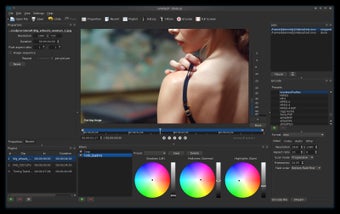
Shotcut comes with a simple yet intuitive interface. With a few tries, you can master the navigation, tools, and functionalities. Unfortunately, Shotcut doesn’t support animations. This is the reason why when you customize or add text, it just remains there in static form. Unfortunately, you can't download text animations from third-party apps. Most users will find this a big disadvantage since it is easier to download animations vs taking the time to create them from scratch.
What are the features?
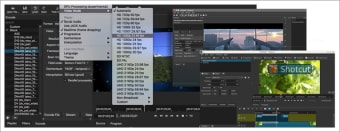
Once you start working on a new project, you get the option of setting the resolution to ‘automatic’ or to a specific dimension. If you choose the former, Shotcut selects the one recommended as per the footage. For video editing, you can choose from multiple presets, including 4K. You can also set the resolution to ‘custom’, which lets you type in the exact frame rate and resolution you desire.
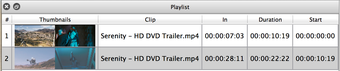
With the drag-and-drop mechanism, it’s easy to add media in the program. The multimedia editing tool supports preview monitoring, which gives you a real-time view of the progress. You can preview each media individually, set specific ‘In’ and ‘Out’ points, drag the media from one pane to another, and perform other tasks. All functions feel intuitive and organic, and works as you’d expect as in professional editors.
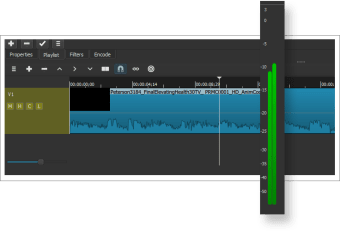
At the first look, it seems like this editing program only provides one layer. However, you can add an infinite number of layers with the program. The only problem is that you need to add layers manually. For instance, you can’t drag a clip over another in the timeline; you need to add a new layer for the clip to be added. While it can be annoying, it’s not a deal-breaker for most users.
Fortunately, populating the timeline is a simple process, and can build a project and start editing quickly. In order to apply effects in the multimedia software, you can click the ‘Filters’ tab, located on the bottom left of the screen, or on the ‘Filters’ icon, located at the top.
If you want to explore the available filters, you can click on the ‘+’ icon. Shotcut divides filters into multiple tabs, including ‘Favorites’. There is a generous selection of special effects to choose between, from positioning and cropping to chroma keying and color correction. The video editing tool is a full-fledged package, allowing you to create stunning visuals.
How to add keyframes in Shotcut?
With Shotcut, adding keyframes feels like a breeze. You can add them to any value and even modify them over time. Once you trigger the keyframe function, it replaces the standard timeline with a chosen clip. You can move the playhead and change the value to view the filter gradually evolve. In addition to this, you can create more keyframes by double-clicking the line in the timeline. It’s important to note that the effect can take a few seconds to get updated in the project.
How to add transitions in Shotcut?
The process of adding transitions is straightforward. You can conveniently move a clip in your timeline over another. As you drag further into the other clip, the transition keeps getting longer. However, don't use this trick while dragging a clip from the playlist, as it would overwrite the existing clip in your timeline. For this process to work, both clips need to be already in the timeline.
On default, the multimedia editing tool uses a standard cross dissolve. If you want to access other options, you can right-click on the main transition in your timeline and click ‘Properties’. While this isn’t very intuitive, it’s an easy way to switch between two transitions.
Can you export files with Shotcut?
The video and audio program comes with an ‘Export’ feature, which lets you conveniently share your creations with others. You can choose from a range of presets, including YouTube options, H.264, animation presets, audio-only options, camcorder options, etc. Moreover, the multimedia software comes with an ‘Advanced’ button, which lets you fine-tune the chosen preset. It’s worth mentioning that this feature is only intended for experienced users.
Enhance your multimedia files
If you’re interested in video editing, Shotcut proves to be an excellent entry point. With detailed forum posts and tutorials, you can get a good understanding of the program. The output files are available in high quality and can be published on various platforms, including YouTube. However, if you often use animations in your videos, you’ll need to use a third-party application as Shotcut doesn’t have an in-app animation feature, yet.